GoPro footage looks flat and washed out? Here's the fix (Protune Flat and GP-Log)
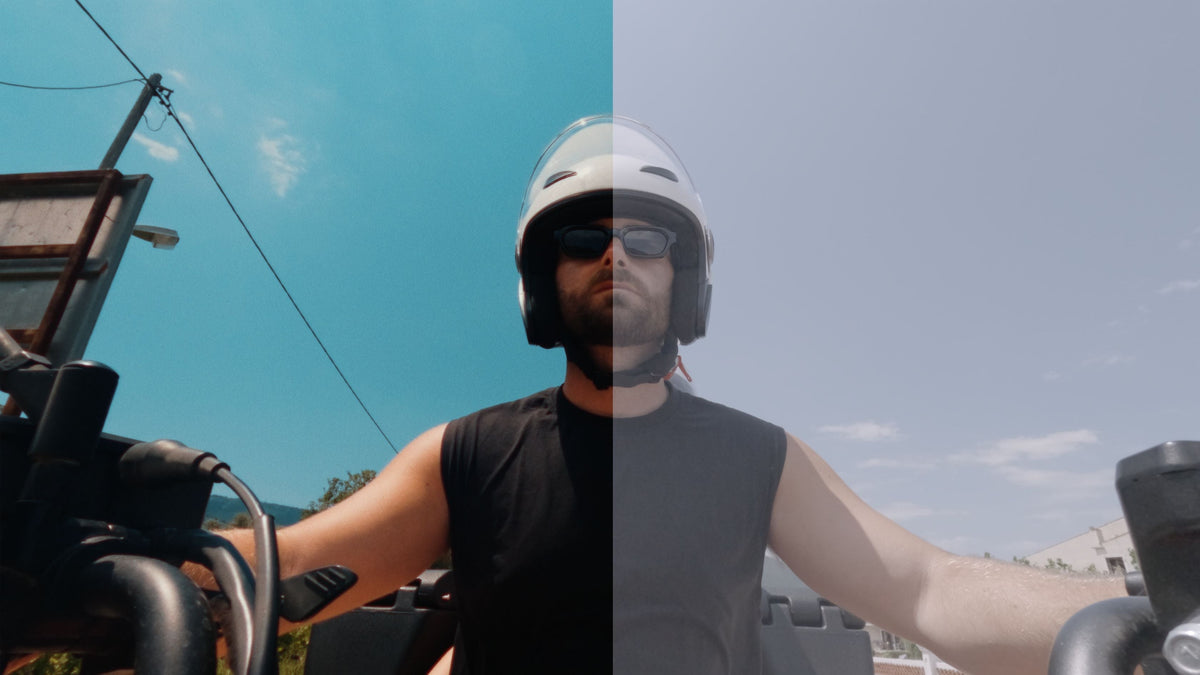
GoPro footage has a look. You know the one. Bright, punchy, slightly plasticky, sharpened to within an inch of its life. It's fine for a clip of the dog on the beach, and it looks nothing like a film.
So you go into the settings, switch the color profile to Flat, or on a newer camera to GP-Log, and shoot the whole trip. Then you get home and everything's gray.
Right. Here's what happened, and how to fix it in about a minute.
The quick answer
Flat and GP-Log are both log-style profiles. They record a washed-out image on purpose so more detail survives in the bright and dark parts. They're not meant to be watched, they're meant to be converted. You fix it with a conversion LUT, applied first, before anything else. Then you grade on top.
Free Aprture Conversion LUT Pack. Includes GoPro Flat and GP-Log.
The thing that catches people out is that Flat and GP-Log are not the same thing and they need different LUTs. Using the wrong one is the number one reason "the LUT didn't work". So let's sort that out first.
Flat vs GP-Log: which one did you shoot?
GoPro has two flat-looking profiles, and which one you've got depends on the camera.
Protune Flat has been around for years. It's on every GoPro back to the Hero 3, and it's the "Flat" option under Color in the Protune settings. It's mildly flat. Less contrast, less saturation, no in-camera sharpening. It's 8-bit on most models, which means it doesn't like being pushed very far in the grade. Think of it as "GoPro with the makeup off" rather than a true log curve.
GP-Log arrived with the Hero 12 and continues on the Hero 13. It's a proper 10-bit log profile, much flatter than Protune Flat, and it holds a lot more when you grade it. If you've got a Hero 12 or 13 and your footage is really gray, almost foggy, that's GP-Log.
How to tell without checking the menu: Flat looks a bit muted, like the saturation's been turned down. GP-Log looks like there's a layer of tracing paper over it.

Why it matters: a Flat-to-Rec 709 LUT on GP-Log footage leaves it looking half-converted and murky. A GP-Log LUT on Flat footage blows it out, with crushed shadows and clipped skies. Match the LUT to the profile and both look right instantly.
The fix, step by step
- Work out which profile you shot (see above).
- Apply the matching conversion LUT as the first thing on the clip. In Resolve, that's the first node. In Premiere, the Input LUT slot in Lumetri. In Final Cut, the Camera LUT in the Inspector. In CapCut desktop, the LUT tab under Adjust.
- Check exposure and white balance. Now that it looks normal you can actually judge it. GoPros shoot a lot of auto white balance drift, so this is where you fix a clip that's gone blue or green.
- Add your look. Creative LUT, grain, whatever. On top of the conversion, never instead of it.

That's it. If you've got a card full of clips, apply the conversion on a shared node or adjustment layer and it's one click for all of them.
GoPro's own LUTs vs ours
GoPro publishes official LUTs for both Flat and GP-Log and they're decent. Two reasons you might want ours instead:
- They're tuned to be a neutral base rather than a finished look, so a creative LUT sits on them properly instead of fighting them.
- They're in a pack with the iPhone, DJI and Sony conversions. If you ever cut a GoPro clip next to drone or phone footage (most people do), having every conversion in one folder is worth a lot.
Both are free. Use whichever looks right to you.
The mistake that makes every GoPro LUT look bad
Someone buys a cinematic LUT pack, drops it straight on their Flat or GP-Log clip, and it looks awful. Crushed blacks, orange skin, sky gone to a flat white slab. They assume the LUT's broken.
The LUT's fine. It was built to sit on a normal (Rec 709) image. Put it on a log image and it's adding contrast to something that's had the contrast deliberately removed, and it overshoots by a mile.
The order is always:
GoPro clip → conversion LUT (Flat or GP-Log) → creative LUT → grain and overlays

GoPro Film LUT pack, built for GoPro footage after conversion.
Making GoPro footage look like film, not like a GoPro
The conversion gets you to "correct". Getting to "cinematic" is a few more things, and they matter more on a GoPro than on almost any other camera because the GoPro look is so recognizable.
Turn the sharpening off. In Protune, set Sharpness to Low (or Off on newer models). GoPro's default sharpening is the single biggest reason the footage looks digital. You can always add a little back in post. You can never take it out.
Lock the shutter. Set the shutter to double your frame rate (1/50 at 25fps, 1/60 at 30fps, 1/120 at 60fps). In daylight that means an ND filter on the lens, or the camera picks 1/2000 and every frame is a frozen still with no motion blur. That stuttery, hyper-real feel is half of what "GoPro look" means.
Add grain. GoPro footage is clean and small-sensor and it needs texture more than anything. A 35mm or 16mm grain overlay at low opacity does a huge amount here. It also hides compression noise and makes the sky look less like a gradient in a spreadsheet.
Consider the lens. Linear or Linear + Horizon Lock modes lose the fisheye, which instantly makes it look less like an action camera. You lose some field of view. Usually worth it for anything that isn't a POV shot.
Back the LUT off. Most creative LUTs look better at 60 to 80% on GoPro footage. At 100% the small sensor's colors get pushed harder than they can take.
If your LUT still isn't sitting right, check out our blog post on - Why your LUT looks bad (7 mistakes, and none of them are the LUT)
Should you even shoot Flat or GP-Log?
For anything you're going to edit and grade: yes, and if you've got a Hero 12 or 13, GP-Log over Flat every time. The 10-bit makes a real difference.
For clips you're posting straight from the Quik app with no editing: no. Standard color, Natural or Vibrant, looks better out of the camera and there's no point recording a flat image you're never going to convert. A flat clip with no LUT is worse than the standard look, not better.
And a word on light: GoPro sensors are small. Log profiles at high ISO get noisy fast. Flat and GP-Log are for daylight and decent light. In a dim room, standard color with the camera's noise reduction doing its job will beat a noisy log clip you've had to rescue.
Quick questions
Which GoPro models have GP-Log? The Hero 12 Black and Hero 13 Black. Older models (Hero 11 and earlier) have Protune Flat only. Check the color setting in the video menu: if you see a Log option, you've got it.
Is Protune Flat the same as Log? Not really. It's a milder, 8-bit flat profile rather than a true log curve. It still needs a conversion LUT to look right, but it won't take as much grading as GP-Log before it starts to fall apart.
Why does my GP-Log footage look green after the LUT? Almost always white balance. GoPro auto white balance drifts, especially underwater or in shade, and the log profile makes the cast obvious once it's converted. Correct white balance before the LUT, or set it manually in the camera (5500K for daylight is a safe start).
Does the conversion LUT work in CapCut? On desktop, yes. It's a standard .cube file and imports like any other. CapCut mobile can't import custom LUTs at all, so you'd need to grade on a laptop or use an app like LumaFusion or VN on the phone.
My footage is noisy after I convert it. Can a LUT fix that? No. That's underexposure or high ISO on a small sensor. Denoise lightly before the LUT if you have the tools, and next time either add light or shoot standard color in the dark.
Do I need a different LUT for the Hero 13 vs the Hero 12? No. GP-Log is the same profile on both. One conversion LUT covers them.